Start with the user workflow, not the audio endpoint
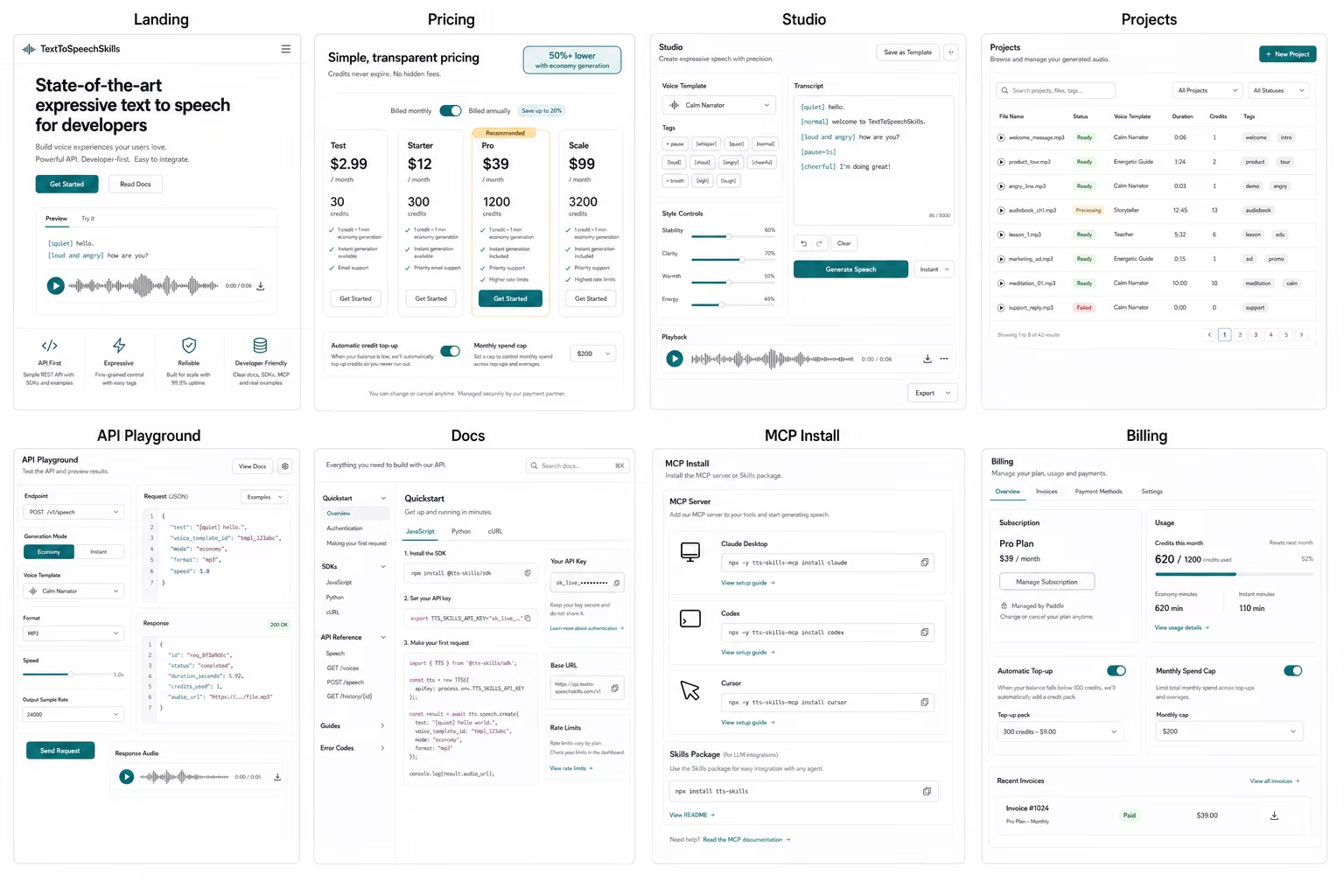
A good LLM speech workflow starts with the moment the user is already in: drafting a product update, turning a support reply into audio, writing lesson narration, or creating lines for a game character. TextToSpeechSkills keeps that path simple. The user writes or asks an LLM app for text, adds natural-language expression directions like [trying not to wake someone] or [excited but professional], chooses a saved voice template, and receives audio when the job is ready. The product does not need to expose engine choices, hidden routing, or complex audio settings in the main experience.
Use expression markup as the contract between humans and agents
Natural expression markup makes voice direction reviewable. A teammate can read a script like [quiet] hello, [loud and angry] how are you, or [nervous but trying to sound brave] I can do this and understand the intent before any audio is created. The same markup can be validated in the UI or API today and through MCP after npm publication, so unclear bracket syntax is caught early. This keeps the creative choice attached to the exact sentence that needs it.
Save voice templates before you automate
Most teams want one recognizable narrator, support voice, course instructor, or product guide. A reusable template stores that voice once, including persona, pace, warmth, stability, style rules, and sample prompts. After that, the LLM only needs a template name and the script. This keeps output more consistent, makes permissions easier, and avoids a long setup conversation every time a user asks for speech.
Give the LLM a small MCP tool surface
After npm publication, MCP will let an LLM app use a focused speech workflow without broad account access. The tool should validate markup, list approved templates, preview credit use, create jobs, and retrieve audio URLs. That will be enough for a non-technical user to ask for narration from chat, but narrow enough for a team to reason about billing and permissions. Until then, use the studio or API; once published, MCP can become a path into the same backend workflow.
Plan generation as jobs so the product stays calm
Speech generation can take longer than a normal UI action, especially for larger scripts. A job-based flow lets the product stay responsive: short requests can complete quickly, and longer work can be checked by status or delivered through a webhook. This also protects secrets because the frontend never needs direct access to provider credentials or internal routing. The user sees clear states, while the backend owns storage, billing, retries, and audio delivery.
Use a minimal production architecture
A production LLM voice feature usually needs four boundaries: a client experience, a trusted backend, a speech job store, and an audio delivery path. The client should collect the script, selected template, and any expression directions. The backend should validate the request, estimate credits, create the job, and enqueue generation. The job store should keep status, error codes, polling URLs, and final audio URLs. The delivery layer should return the finished file without exposing provider credentials. This shape keeps the first launch understandable while leaving room for webhooks, retries, and workspace permissions later.
Decide what the LLM is allowed to do
The safest LLM speech setup is explicit about permissions. An assistant can draft a script, suggest expression markup, choose from approved templates, preview credit use, create a job, and summarize the result. It should not be able to create arbitrary billing changes, use hidden voices, rotate account keys, or generate unlimited audio without a user-facing limit. That separation makes it easier to explain the feature to buyers because the agent is doing useful creative work inside a narrow operational lane.
Design status states before edge cases appear
Voice generation feels more reliable when every state has a plain-language explanation. A new job can be queued, processing, completed, failed, or waiting for account setup. A completed job should show the audio URL, duration, credit cost, and template used. A failed job should say whether the script, template, billing state, webhook, or provider route caused the problem. These details help support teams answer questions quickly and help developers avoid vague error handling once the workflow becomes part of a real product.
Launch with pricing and guardrails visible
Text-to-speech can become expensive when agents create audio automatically, so usage controls should be part of the launch product. Credit visibility, optional packs, and workspace billing keep teams comfortable as adoption grows. The product should explain how setup, templates, natural expression markup, jobs, and billing fit together so everyone understands the workflow before it becomes part of daily work.
What to measure after the first users arrive
After launch, watch which templates are used most often, which expression directions need better examples, which jobs fall back to background generation, and where users abandon setup. Those signals tell you whether the product should improve documentation, add new templates, or tune pricing. They also create useful future content: real workflow lessons can become better docs, stronger landing pages, and more specific blog posts that answer the questions users actually ask.
Test the complete path before inviting a team
A useful launch test starts with a fresh account and follows the same path a real user will take. Today, create a scoped key, list approved templates through the API, validate a marked-up script, estimate usage, create a short job, and open the returned audio. After npm publication, repeat the checklist in each supported MCP client. Test an invalid tag, an expired key, insufficient credits, and a longer background job so unclear setup copy, broad permissions, vague job states, and inaccessible audio links are caught before rollout.
Create a rollout checklist for every LLM client
Different LLM clients expose environment variables, tool approvals, logs, and server restart behavior in different places. Keep one short checklist per supported client with the exact install command, where the scoped key belongs, which tools should appear, how to run a harmless validation call, and how to remove access. Name an owner for the key and a date for rotation. A client-specific checklist is more valuable than a generic compatibility claim because it gives support teams a repeatable way to diagnose setup without asking users to reveal credentials or paste private configuration into chat.
Know when to move from MCP to the API
After npm publication, MCP can be a useful first interface when a person is working in chat and wants the model to prepare and create speech. A direct API is the available boundary today and remains the better choice when generation is triggered by product events, needs strict latency guarantees, runs at large volume, or must integrate with an existing queue and observability stack. The transition does not need a new content model. Keep the same template IDs, expression markup, credit estimates, job statuses, and webhook rules. Only the caller changes.
Write an operating note for the team that inherits it
Before calling the integration finished, document who owns the workspace, where keys are rotated, which templates are approved, how credits are reviewed, and what a support teammate should inspect when a job fails. Include one known-good test script and its expected template, status sequence, and audio result. A short operating note prevents the feature from depending on the memory of its first developer. It also gives incident responders a clean starting point when a client update, expired credential, billing state, or webhook change interrupts generation months after launch.
Sources
References and further reading
Claims are checked against current first-party documentation. Product details can change after publication.