Why tone belongs in the script
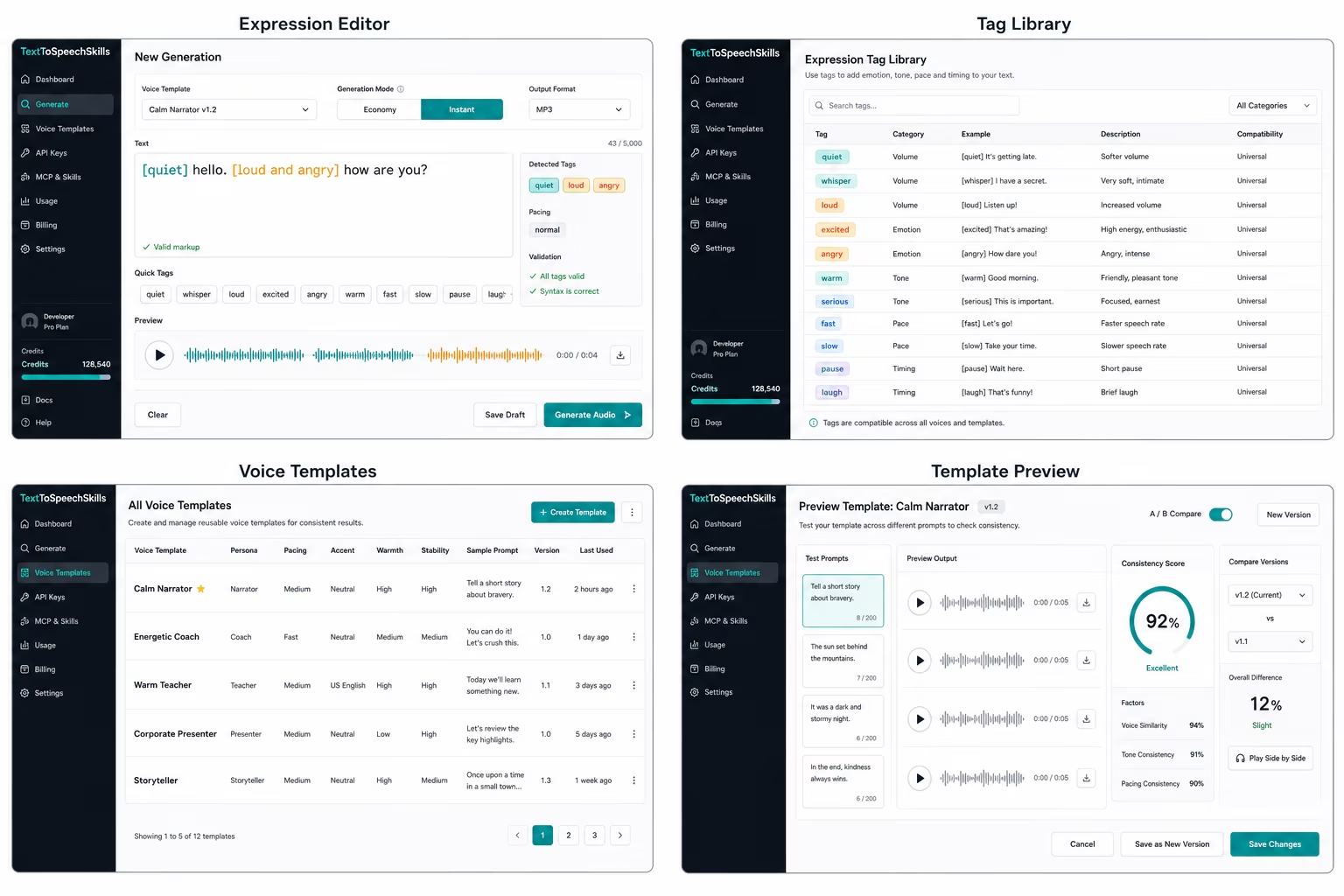
Voice direction is often lost when it lives in a separate prompt. A writer asks for a calm narrator, a developer passes a string to an API, and an LLM agent rewrites the text later. Natural expression markup keeps the delivery instruction beside the words that need it. A line such as [quiet] welcome back, [excited but still professional] your report is ready, or [trying not to wake someone] come here can be read, edited, approved, and versioned like normal copy. That makes generated speech less mysterious for the people responsible for quality.
Readable natural directions make review faster
The best expression directions are obvious to non-technical users. They describe intent in plain language rather than exposing low-level audio controls. TextToSpeechSkills validates bracket syntax and shows starter examples, but it does not force every useful cue into a fixed menu. This makes the workflow easier to learn because users can see examples clearly while still writing the direction the scene actually needs.
LLM workflows need validation before generation
When an LLM prepares narration, it may write an overlong or vague performance note. A validation step lets the agent check bracket syntax, simplify unclear directions, and preview credit use before creating audio. That makes automation easier to trust. Instead of letting the agent send raw text into an unknown process, the workflow becomes a sequence of visible steps: write, validate, choose a template, create, and return audio.
Write markup rules that humans can remember
A markup system becomes useful when the rules are small enough for a writer to remember after one example. Bracket directions should be short, close to the sentence they affect, and written as performance intent rather than technical controls. Good directions explain the scene: [calm but urgent], [whispering], [trying not to laugh], or [clear and patient]. Weak directions try to control every acoustic detail at once. A product should teach a few starter patterns, then encourage users to write the emotional or contextual cue that makes the line easier to perform.
Give agents examples with boundaries
LLM agents need examples that show both good markup and the limits of the workflow. A prompt can tell the agent to keep bracket directions concise, avoid stacking many cues on one sentence, preserve user-approved wording, and ask for confirmation before turning long drafts into billable audio. The examples should include ordinary product copy, lesson narration, support replies, and character dialogue. That gives the agent enough variety to be helpful without teaching it to over-direct every sentence.
Review markup separately from final audio
Teams get better results when they review the script before generating audio and then review the audio after generation. The script review catches tone choices, brand language, and unclear delivery notes while edits are still cheap. The audio review catches performance fit, pacing, and whether the template matches the use case. Keeping those two review moments separate is especially helpful for teams that use LLMs, because the assistant can improve the marked-up script before anyone spends credits.
Tags and templates solve different problems
A voice template defines the stable identity of a voice: persona, warmth, pace, and style rules. Expression markup defines moment-by-moment delivery. Teams need both. The template keeps a narrator recognizable across a course, channel, product, or game. Bracketed directions let one sentence sound cautious, another enthusiastic, and another urgent. Keeping those concepts separate makes prompts smaller and makes it easier to compare versions when the team changes either the script or the voice.
Examples that map to real use cases
Game teams can mark enemy warnings, tutorial hints, and mission updates with different energy. Video creators can direct hooks, transitions, and calls to action. Support teams can keep replies calm while adding emphasis to important steps. Course builders can slow down definitions and brighten lesson summaries. These examples belong on launch pages because they answer the real search intent behind expressive text-to-speech: people want to know whether the workflow fits the content they already create.
Use starters as examples, then write the scene
A focused starter library is easier to learn and safer for agents. Launch pages should show useful patterns such as [quiet], [whispering], and [loud and angry], then make it clear that users can write richer directions like [nervous but trying to sound brave]. That keeps the UI clean while showing expression as flexible natural language.
Turn examples into reusable documentation
Expression markup becomes easier to adopt when every starter pattern has a practical example. A launch site should show how natural directions work for a support reply, a video hook, a lesson explanation, and a character line instead of only listing short labels. Those examples help buyers imagine the product in their own workflow and give teams better starting points for scripts they will actually use.
Build a review rubric instead of chasing one perfect take
Teams review expressive speech more consistently when they agree on a small rubric. Score whether the spoken words match the approved script, whether the intended emotion is audible without becoming theatrical, whether pauses land near the marked direction, whether names and numbers are clear, and whether the result still sounds like the selected template. Keep a short reference clip for each important template and compare new output against it. The rubric turns feedback such as make it better into a concrete edit: simplify the direction, move it closer to the sentence, change the wording, or revise the stable template rather than stacking more tags.
Handle pronunciation as its own layer
Expression and pronunciation solve different problems. A cue such as [careful and reassuring] describes performance; it should not carry the burden of teaching a product name, acronym, date, or technical term. Keep an approved pronunciation list for recurring names and test it with the same sample script used for template review. When a line fails, decide whether the issue belongs in wording, pronunciation policy, template identity, or local expression markup. That separation makes scripts easier to read and prevents a one-off pronunciation workaround from quietly changing the emotion of every future line.
Version marked-up scripts like product copy
A marked-up script is part of the user experience, so store it beside the plain text, template version, job result, and reviewer decision. When a team changes a direction, it should be possible to see whether the words changed, the performance note changed, or the template changed. This is especially important for regulated support messages, learning content, and repeatable product announcements. Version history also creates better examples: teams can show which small markup edit fixed a pacing problem instead of publishing an unexplained final clip with no path back to the decision.
Maintain a small set of regression scripts
Keep five or six short scripts that cover the directions your product relies on most: neutral explanation, restrained excitement, reassurance, urgency, a quiet aside, and one pronunciation-heavy line. Regenerate them when the speech route, template, validation rules, or markup guidance changes. Reviewers can then compare the new clips with approved references instead of relying on memory. This does not make voice quality perfectly objective, but it catches obvious drift and provides concrete evidence when a team decides whether a change belongs in the template, the script, or the local expression direction.
Sources
References and further reading
Claims are checked against current first-party documentation. Product details can change after publication.