Consistency is a product requirement
A user can forgive one imperfect line, but they notice when the same narrator changes personality between prompts. Consistent speech matters for product updates, learning content, support replies, game characters, and video channels because the voice becomes part of the experience. Voice templates give teams a stable object to reuse. Instead of describing the voice from memory every time, the product sends a template ID and the script.
What a useful template should contain
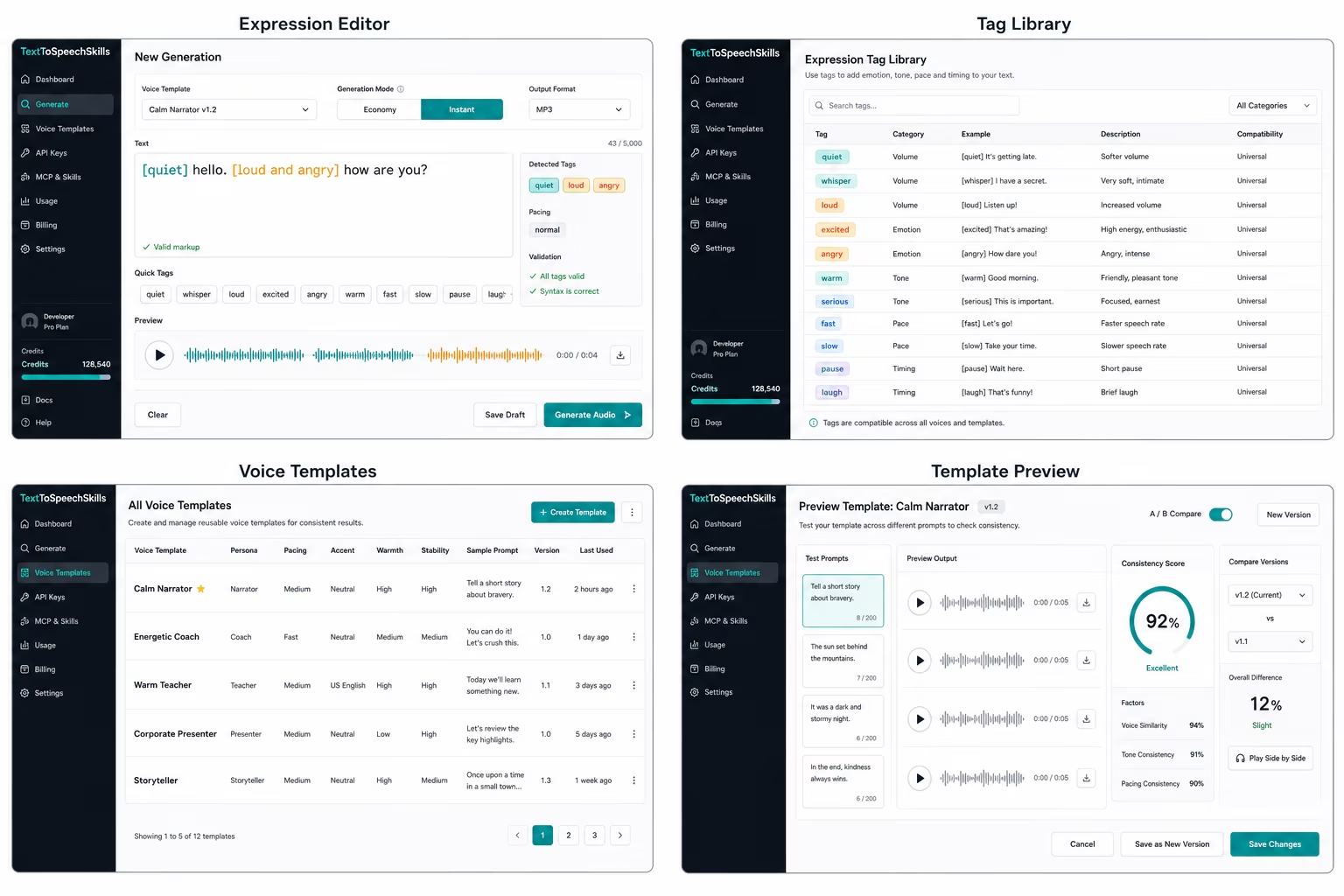
A practical voice template includes a name, persona notes, tone, pace, warmth, stability, language, sample prompts, and style rules. It should also be versioned. Versioning lets a team compare a warmer support voice or a faster product narrator without changing every workflow at once. TextToSpeechSkills treats templates as shared assets for the studio and API today, with MCP and skills reuse following after npm publication.
Templates make LLM setup simpler
LLM users should not need to describe a voice in a long prompt each time they create audio. A template turns that subjective instruction into a short, approved name. The agent can be told which templates are allowed, then it can focus on the script and natural expression cues. This keeps output more consistent and gives account owners a clearer permission boundary.
Separate template identity from delivery
A common mistake is asking one prompt to define the voice, direct the scene, and generate the script at the same time. Templates work better when identity stays stable and delivery stays local to the line. The template should define who the voice is, what it is for, and how it usually sounds. Expression markup should handle the moment: softer, brighter, more urgent, more careful, or more playful. This separation lets a support voice stay recognizable while still sounding different during an apology, a warning, or a friendly onboarding message.
Use approval states for team workflows
Template libraries need simple governance once more than one person creates audio. A draft template can be tested by the creator, an approved template can be used by the team, and an archived template can remain attached to old jobs without being offered for new work. That gives workspace owners a clear way to introduce new narrators or characters without surprising everyone. It also gives developers a stable contract: production jobs can reference approved template IDs instead of free-form voice descriptions.
Measure consistency with repeated scripts
The fastest way to test a template is to run the same short script across several contexts. Use a neutral intro, an urgent update, a reassuring support reply, and a longer explanatory paragraph. If the voice still feels like the same narrator across those prompts, it is probably ready for real use. If it changes personality too much, revise the persona, pace, or style rules before adding the template to an agent workflow. Repeated scripts turn subjective voice review into a more practical comparison.
Different teams need different template habits
A YouTube channel may need one narrator and a few variants for ads or Shorts. A game team may need templates for major characters, tutorial narration, and system messages. A support team may need a calm reply voice and a warmer onboarding voice. A learning team may need an instructor voice that stays stable over a long course. Each workflow deserves examples that feel specific instead of a generic list of features.
Templates help with cost and governance
When voice settings are approved in advance, teams can let more people create audio without giving everyone broad account access. Workspaces, scoped keys, and usage reporting work better when the creative surface is predictable. The LLM or user picks from allowed templates, the backend tracks usage, and team owners can review which voices are being used across projects.
How to launch your first template library
Start with three templates: a calm narrator, an energetic product guide, and a clear support voice. Add sample scripts that represent real usage, then test the same script with different natural expression directions. Promote only the templates that sound reliable across many prompts. This gives the product enough flexibility at launch while keeping the experience easy to explain on pricing, docs, and audience pages.
Make templates part of onboarding
A new user should not land in an empty voice library. Seed the account with practical templates, show where each one fits, and let users save their own versions after a few generations. That creates a faster first success and a stronger habit: people begin to think in terms of reusable voices instead of one-off audio files.
Name templates for the job they perform
Names such as Voice 4 or Friendly Female make a library hard to govern because they describe a setting, not a responsibility. Prefer names such as Calm Product Narrator, Warm Course Instructor, or Concise Support Guide. Add the intended audience, language, common script length, and one sentence about when not to use it. Functional naming helps an LLM choose correctly and gives reviewers a shared expectation before they press play. It also keeps the library understandable when the original creator leaves the team or when several voices have similar acoustic qualities but very different content roles.
Use a controlled promotion process
Treat a template change like a small product release. Draft the new version, run the standard script set, compare it with the current approved version, and ask one owner to approve the change. Keep old completed jobs linked to the version that created them. Promote only after the new version works for neutral explanation, urgency, reassurance, longer paragraphs, and the local expression directions the team uses most often. This process is deliberately lightweight, but it prevents one enthusiastic edit to warmth, pace, or persona from changing every automated workflow at once.
Audit the library as usage grows
A quarterly template audit can stay simple: list active templates, owners, last use, supported languages, example scripts, approval status, and the workflows that call each ID. Archive duplicates, retire templates with no owner, and split any template that is being stretched across incompatible jobs. Review failed or repeatedly regenerated audio for patterns. If one template needs constant local corrections, its baseline instructions may be too vague. If users keep choosing the wrong template, the name or description may be unclear. A small maintenance habit preserves consistency better than adding more settings to every generation form.
Document fallback behavior before automation expands
Every workflow should say what happens when an approved template is unavailable, a generation fails, or a requested language has not been reviewed. For customer-facing audio, silently substituting a different voice can be more damaging than returning a clear failure. Decide whether the caller should retry, select a named fallback, send the job for human review, or keep the text-only experience. Store that policy with the template assignment rather than in an agent prompt alone. A visible fallback rule keeps identity consistent and makes automated speech easier to support as more products and teams begin calling the same library.
Sources
References and further reading
Claims are checked against current first-party documentation. Product details can change after publication.